A customer enters a VAT number at checkout, Stripe accepts the payment, and the invoice comes out with zero VAT. That looks straightforward until the number belongs to a different legal entity, VIES is unavailable, or the billing country doesn't match the VAT prefix. In a reliable Stripe EU VAT flow, a successful lookup is evidence for a tax decision, not permission to exempt every invoice indefinitely.
The practical fix is to make each VAT check a dated, auditable treatment decision. Save the result and the customer details that informed it, define what happens when the answer is invalid or unavailable, and grant reverse-charge treatment only when the required checks pass.
Table of Contents
- Which VAT Treatment Applies to Each EU Customer
- Stripe Settings That Control Tax Treatment
- What a Valid VAT ID Check Actually Proves
- Wiring the VAT Check Into Node.js and Python
- Handling VIES Timeouts and Invalid Numbers
- Invoice Fields That Prove Zero-Rate Treatment
- Confirm the Treatment Before You Charge the Customer
Which VAT Treatment Applies to Each EU Customer
| Customer case | Place of supply | VAT ID needed | Invoice VAT |
|---|---|---|---|
| EU business customer, different country from seller, valid VAT ID | Customer's member state | Yes, validated | 0% VAT with reverse-charge wording |
| EU business customer, same country as seller | Seller's member state | Not used for zero rating | Domestic VAT rate |
| EU business customer, different country, no valid VAT ID | Customer's member state | Missing or invalid | Destination VAT rate |
| EU consumer, cross-border, below €10,000 combined EU threshold | Seller's domestic rules | No | Seller's domestic rate |
| EU consumer, cross-border, above €10,000 combined EU threshold | Customer's member state | No | Destination VAT rate |
| Customer outside the EU, such as the UK, Switzerland or Norway | Destination country | Checked separately | Destination-country rules |
For the common reverse-charge case, the customer is an EU business in a different member state from the seller, and its VAT ID validates. The customer's member state is the place of supply for this scenario. The invoice shows zero VAT and the required reverse-charge wording, while the validation record supports the decision if the invoice is questioned later. The meaning and practical operation of reverse-charge VAT are worth keeping distinct from an ordinary zero-rated sale: the customer, not the supplier, accounts for VAT under the reverse-charge mechanism.
A VAT ID alone doesn't make a domestic sale cross-border. If seller and customer are in the same member state, the seller generally charges domestic VAT rather than applying reverse charge. For a cross-border business customer whose VAT ID is missing or invalid, don't treat the number as an exemption; apply the relevant customer-country treatment for the transaction instead.
Consumer sales and customers beyond the EU
For qualifying cross-border B2C sales, the One Stop Shop framework uses a single €10,000 annual EU-wide threshold, measured across EU member states combined. The framework replaced the previous distance-selling thresholds on 1 July 2021. Below the threshold, the seller's domestic VAT rules may apply; after it's exceeded, VAT is generally due in the customer's member state. Stripe's EU tax documentation describes the combined threshold and why billing logic needs to account for customer location and transaction type, not just the seller's country.
The table's final row is a boundary, not a shortcut. A UK, Swiss or Norwegian customer is outside the EU reverse-charge case shown for intra-EU B2B supplies, so check the destination country's requirements separately. For a wider view of the operational work behind collection and remittance, managing VAT payments in 2026 can help frame the payment side of the process.
In practice, reduce the first decision to three questions: Where is the customer? Are they buying as a business? Does their VAT ID validate? Then confirm that your registrations and invoice workflow support the treatment the answers call for.
Stripe Settings That Control Tax Treatment
Before issuing the first live invoice, check each Stripe setting that can change whether tax is calculated or how the invoice presents it.
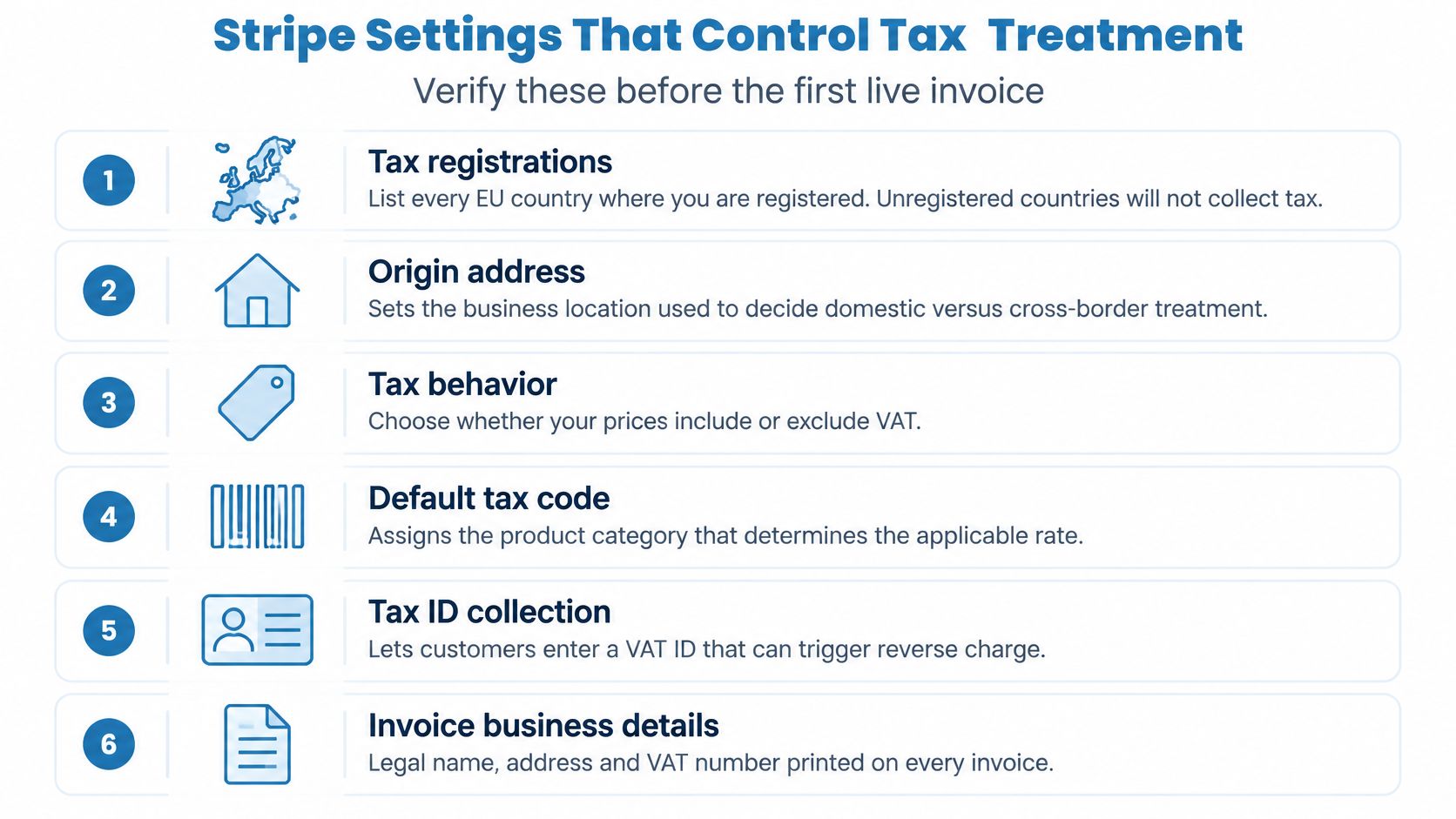
- Tax registrations: Add the countries where you're registered, or the relevant One Stop Shop registration. Without an active registration for the applicable location, Stripe won't collect tax there.
- Origin address: Confirm the seller's business address. Stripe uses it to establish the seller's location, so an incorrect address can distort the domestic-versus-cross-border decision.
- Tax behavior: Decide whether prices are tax-inclusive or tax-exclusive before publishing them. Changing the setting later can alter customer totals.
- Default tax code: Assign the right product category so Stripe can determine the applicable tax treatment and rate. A generic or incorrect code can produce the wrong calculation.
- Tax ID collection: Enable VAT ID collection on the Checkout path your customers use. If buyers can't submit the number, your system may not have the evidence needed to consider reverse charge.
- Invoice business details: Make sure legal name, address and VAT number are present and print on the generated invoice. A correct tax calculation can still leave a weak invoice if the supplier details are missing.
Also confirm that stored EU customer IDs use Stripe's eu_vat tax ID type and carry the right country. Enable automatic tax on every invoice-producing path, including subscription renewals and invoices created outside Checkout. A setting applied only to initial checkout won't protect a renewal created by a different billing path.
When a valid cross-border eu_vat ID is stored and the seller's origin address is in another member state, the Stripe Tax configuration can apply the reverse-charge treatment to an invoice. Test each setting in test mode before going live, including the path that creates the actual subscription invoice. The configuration only works when the registration, product, customer and invoice data agree.
What a Valid VAT ID Check Actually Proves
A Berlin agency enters a valid Austrian VAT ID. Its billing address is in Vienna, but the registry response names a different trading entity. The number validates, yet the record isn't clean enough to support a zero-rate invoice without checking whether the purchaser and contracting party are the same business.
An active result means the VAT number is valid and the business is registered in VIES at the time of the check. It doesn't establish every fact needed for reverse charge. A successful response supports the customer's VAT status, but it doesn't prove that the buyer is acting as a taxable business in this purchase, that the billing address belongs to the contracting entity, or that the place-of-supply rule calls for reverse charge. The European Parliament's briefing on VAT in the Digital Age emphasizes transaction-level records and structured e-invoicing, a direction that makes a saved yes-or-no result too thin for a durable decision record.
Keep three checks separate
A checkout needs three different kinds of confidence. First, a local format check catches typos, malformed numbers and incorrect prefixes before making a remote request. It can reject a number that couldn't be valid, but it can't establish current registration.
Second, the registry response checks whether that number is recognized in VIES. TaxID routes checks to VIES, caches the result and returns it. It doesn't maintain its own VAT-registration database and isn't affiliated with the European Commission or VIES.
Third, compare the registry response with the transaction. Check that the returned country and registered identity fit the billing record and the business that's contracting. If the VAT prefix and billing country conflict, or the returned name doesn't match, send the record for review rather than treating the registry result as a complete business-eligibility test.
Store the decision, not just the answer. Keep the normalized country and number, registry response, timestamp, billing address and invoice treatment together.
A cached result can make checkout more responsive, but it needs an explicit freshness policy. Recheck when key billing details change or when a later transaction needs a current decision. Treat the result as time-bound evidence tied to a specific customer, transaction and invoice, not as a permanent exemption flag.
Wiring the VAT Check Into Node.js and Python
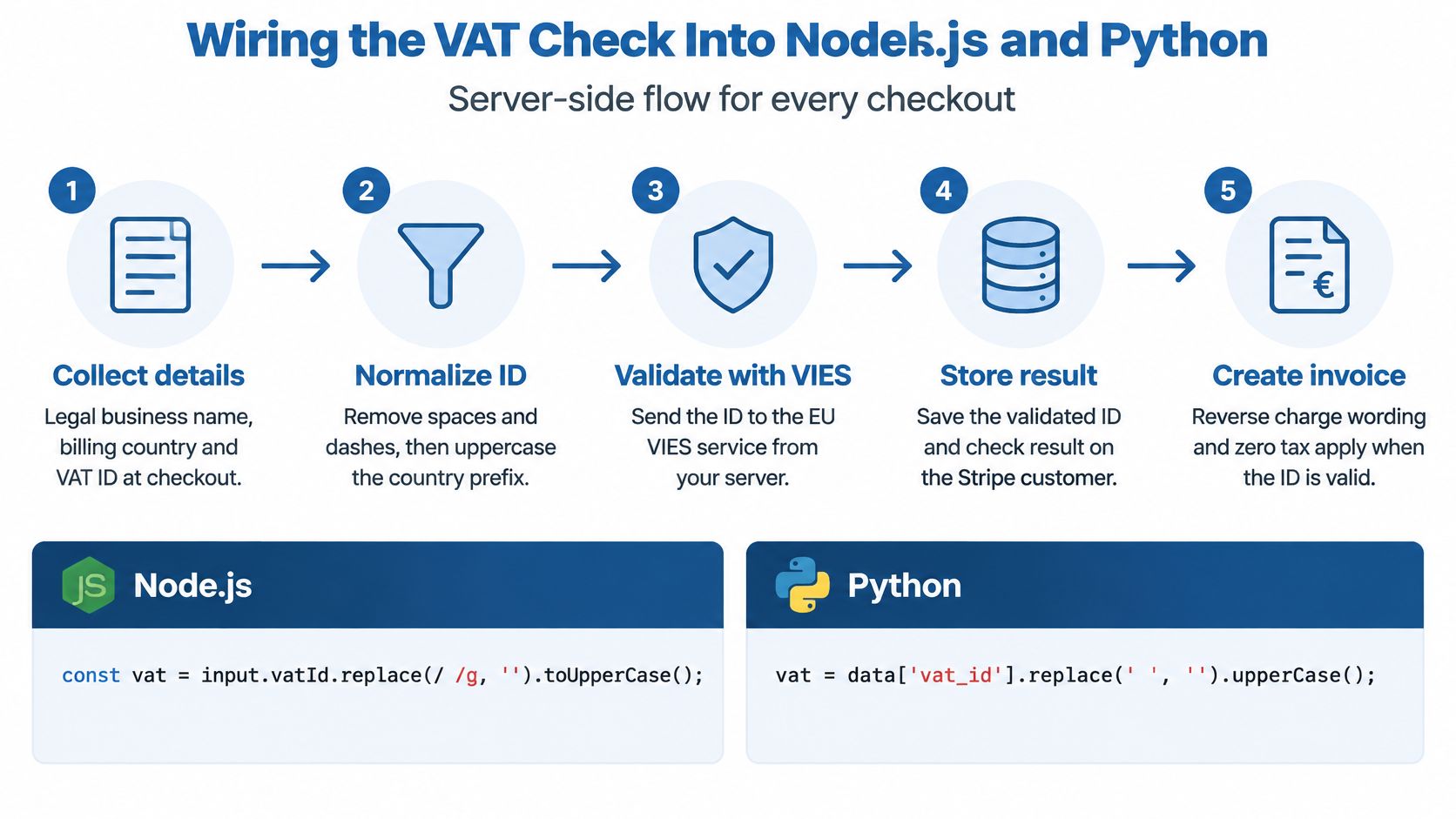
Treat VAT exemption as a controlled server-side decision. The browser can collect the legal business name, billing country and VAT ID, but only server code should validate the number, compare the registry response with the checkout record, and attach the tax ID to the Stripe customer. Client-side checks improve the form experience. They grant nothing.
The server-side sequence
- Collect the business details. Ask for the legal business name, billing country and VAT ID. Keep the submitted values with the checkout record so you can compare them with the registry response.
- Normalize the ID. Remove spaces and punctuation while retaining the country prefix. Stripping the prefix makes the number impossible to interpret, since the same digits can exist under different member states.
- Check the format locally. Apply the country-specific syntax rules before calling a remote service. TaxID runs the same check on each country endpoint before contacting VIES, so a malformed number fails without consuming a registry lookup.
- Validate remotely and compare identities. TaxID's endpoint is
GET /api/v1/validate/:country/:vat. Send the request tohttps://www.taxid.dev/api/v1/validate/followed by the country code and VAT number, with the API key in theAuthorization: Bearer ...header. Then compare the returned country, registered name and address with the customer record. - Set the Stripe tax ID only after the checks pass. For a valid, matching result, create a Stripe customer tax ID of type
eu_vat. Save the validation evidence with the customer and invoice; for any other outcome, leave the customer in a non-exempt decision state.
This order prevents a syntax check from masquerading as proof of registration. It also avoids a race where invoice creation runs before a remote validation finishes. The European Parliament's technical briefing on VAT information exchange describes VIES as the EU system for checking VAT-number validity and highlights the need to retain validation details. Put the API key in a server environment variable, set a timeout, and never expose the credential in browser code.
Node.js and Python examples
Both examples treat an active result, meaning the number is valid and the business is registered in VIES, as a reason to continue to the identity-comparison step. Any other result leaves the checkout without an exemption. Adapt the response-field access to the exact JSON shape used by your integration.
async function validateVat({ country, vat, apiKey }) {
  const normalized = vat.replace(/[^\w]/g, "").toUpperCase();
  const url = `https://www.taxid.dev/api/v1/validate/${country}/${normalized}`;

  const response = await fetch(url, {
    headers: { Authorization: `Bearer ${apiKey}` },
    signal: AbortSignal.timeout(5000),
  });

  if (!response.ok) {
    return { status: "unavailable" };
  }

  const result = await response.json();

  if (result.status !== "active") {
    return { status: result.status ?? "unavailable" };
  }

  return {
    status: "active",
    companyName: result.company_name,
    address: result.address,
    response: result,
  };
}
import requests

def validate_vat(country, vat, api_key):
    normalized = "".join(ch for ch in vat if ch.isalnum()).upper()
    url = f"https://www.taxid.dev/api/v1/validate/{country}/{normalized}"

    try:
        response = requests.get(
            url,
            headers={"Authorization": f"Bearer {api_key}"},
            timeout=5,
        )
        response.raise_for_status()
    except requests.RequestException:
        return {"status": "unavailable"}

    result = response.json()

    if result.get("status") != "active":
        return {"status": result.get("status", "unavailable")}

    return {
        "status": "active",
        "company_name": result.get("company_name"),
        "address": result.get("address"),
        "response": result,
    }
Three details in this code matter more than the HTTP call itself. The five-second timeout bounds how long a checkout can stall waiting on VIES. The ?? "unavailable" fallback converts a missing or unexpected status into a safe state rather than an exception. And the functions return the full response, so the caller can persist the request ID, timestamp and raw payload alongside the treatment decision.
Neither example creates a Stripe exemption because a response arrived. Compare the returned company name and address with the checkout record first, then add the eu_vat tax ID. An unavailable result stays retryable or goes to review; it never becomes a valid state by default. That stored, dated record is what turns a passing API call into a zero-rate treatment you can defend later.
Handling VIES Timeouts and Invalid Numbers
Use a distinct state for each failure so the order receives a deliberate tax treatment. A timeout or ambiguous response is not a valid VAT ID. Keep the customer out of reverse charge until the check succeeds.
| Symptom | Likely cause | What to do |
|---|---|---|
| Malformed number, wrong length or prefix | Typo, pasted spaces or wrong country prefix | Reject before any remote call and ask for a corrected number |
| Well-formed number returns invalid | Not registered in VIES | Keep standard VAT, show a message and offer another number |
service_unavailable or timeout |
VIES outage or slow response | Set unavailable or retryable, charge standard tax, ask the customer to resend once VIES recovers |
| VAT prefix differs from billing country | Customer entered another country's number | Send to manual_review and don't apply reverse charge |
| Valid at signup, invalid on a later check | Registration cancelled or changed | Change treatment on the next invoice, notify the customer and log a new event |
| Ambiguous or incomplete response | Unexpected payload or missing status | Treat as unavailable, never as exempt, and retry later |
The failure teams most often mishandle is an outage. A timeout says the service couldn't confirm registration, not that the registration is valid. In TaxID's flow, a service_unavailable response allows the order through with standard tax and asks the customer to resend the number once VIES recovers. For implementation details on this case, see handling a VIES service-unavailable response.
Model states as events
Track the full state set: pending, valid, invalid, unavailable and manual_review. Give each state a clear transition rule, and write an immutable event whenever the state changes. That event should capture the submitted and normalized values, the response or failure, the timestamp, and the decision made for the invoice.
A number that validated at signup can fail a later check. In that case, don't overwrite the old evidence or alter an issued invoice without a record. Apply the new result to the next invoice, notify the customer that their tax treatment needs attention, and retain both decision events. This gives support and finance a traceable account of what the system knew when it issued each invoice.
Invoice Fields That Prove Zero-Rate Treatment
A zero-VAT invoice has to show both the transaction and the evidence behind its treatment. For an intra-EU B2B supply under reverse charge, the document needs to carry:
- Supplier VAT ID, legal name and address
- Customer VAT ID, legal name and address
- Invoice date and a description of the supply
- Taxable amount and currency
- A "reverse charge" reference or the accepted legal equivalent
The customer's VAT number and the reverse-charge wording are what mark the buyer as the party liable for the tax.
Store the underlying decision alongside the customer and invoice, not only as text on a PDF. Keep vat_number, company_name, address, validation_status, request_id and validated_at, plus the registry response and the tax treatment applied. That dated record is what answers an audit question later: which number was checked, what VIES returned, and why the invoice went out at zero. For a field-level checklist aimed at SaaS billing, see EU VAT invoice requirements for SaaS.
Make zero VAT an atomic outcome
Run the decision as one gated operation: establish the place of supply and customer status, require a valid VAT ID for the relevant intra-EU B2B case, and calculate zero VAT only after that decision succeeds. Missing evidence blocks invoice finalization, payment or entitlement activation, depending on your billing flow. If validation can't complete, the order proceeds at standard tax; nothing in the flow grants exemption by default.
Reverse charge moves the obligation to account for VAT onto the customer. Zero VAT on your invoice doesn't make the transaction tax-free. Treat issued invoices as immutable records: if one is wrong, issue a linked credit note or correction and a new invoice rather than editing the original document.
Keep identifiers, dates, amounts, correction references and exemption reasons as structured fields your system can export. A PDF alone isn't structured invoice data, and cross-border B2B invoicing is moving toward structured e-invoicing and digital reporting under the European Commission's VAT in the Digital Age work programme.
Confirm the Treatment Before You Charge the Customer
Before going live, run the decision through Stripe in test mode and inspect the resulting invoice and evidence record. Four cases should work:
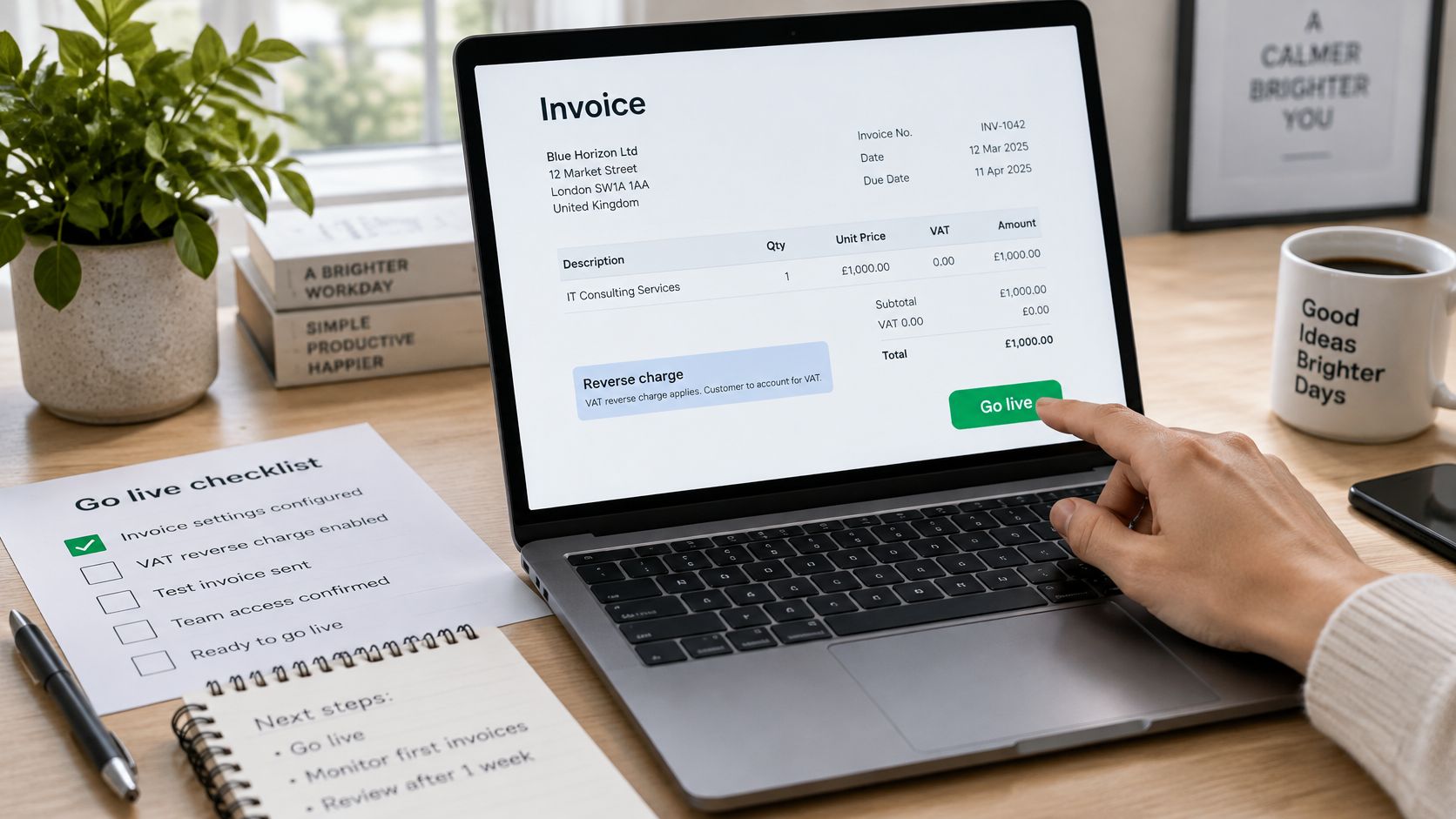
- Valid cross-border VAT ID: The invoice has zero VAT and reverse-charge wording, and the matching validation evidence is saved.
- Invalid VAT ID: The invoice keeps standard VAT treatment for the transaction.
- Simulated unavailable response: The order proceeds without an exemption, or moves to review under your chosen policy.
- Every invoice: The invoice can be matched to a dated record of the validation result and tax decision.
Set the revalidation rule in one place. Cache a successful result for a short, explicit period to keep checkout responsive, but revalidate when the billing country or legal name changes, before a renewal invoice on a long-running subscription, and after a failed or ambiguous response. The record should show both when the check happened and which invoice decision used it.
If you don't want to maintain the validation wrapper, TaxID offers a Node.js integration for EU VAT validation with a single HTTP call. Its free tier includes 100 VAT validations per month and doesn't require a credit card, so you can test the full checkout-to-invoice path before relying on it in production.
Run one test-mode invoice this week with a valid cross-border VAT ID, then keep the dated validation record beside the invoice. That single end-to-end test will show whether your Stripe settings, fallback and audit trail work together before a customer depends on them.
Use TaxID to validate EU VAT IDs through a single REST endpoint and keep machine-readable results in your Stripe billing flow. Start with a test-mode invoice, verify that an unavailable response never grants exemption, and carry the same evidence through to the final invoice.