A billing request can succeed at the transport level and still produce a result that needs careful handling. Your checkout service receives HTTP 200 OK, then parses JSON showing "valid": false. Or it receives HTTP 503 with "code": "service_unavailable", even though the request body is perfectly formed. Reading only one signal creates bad decisions, such as applying reverse charge to an unverified VAT number or retrying a malformed request until the system reaches its limit.
An HTTP status code tells your client how the server handled the request. A custom machine-readable code explains the application outcome in more detail. That separation is the foundation of a useful api response codes list, especially in VAT validation, where syntax errors, registry rejections, authentication failures, quota limits, and upstream outages require different next steps. HTTP response codes use standardized classes, from 1xx informational responses through 5xx server errors, as defined in RFC 9110.
The ten examples below follow a VAT-validation lifecycle. Use them to decide whether to fix the request, request credentials, check permissions, wait for a quota window, retry safely, queue validation, or escalate an infrastructure problem. The status is your routing signal. The JSON body, headers, logs, and TaxID-specific result determine what your application does next.
Table of Contents
- 1. 200 OK
- 2. 400 Bad Request
- 3. 422 Unprocessable Entity
- 4. 401 Unauthorized
- 5. 403 Forbidden
- 6. 404 Not Found
- 7. 429 Too Many Requests
- 8. 503 Service Unavailable
- 9. 502 Bad Gateway
- 10. 201 Created
- Top 10 API Response Codes Comparison
- Turn Status Codes Into Reliable Workflows
1. 200 OK
200 OK means the API processed the VAT-validation request and returned a response. In a SaaS billing flow, that could mean a customer enters a VAT number, your backend submits it to TaxID, and the response contains the registered company name, address, and validation result in JSON.
That doesn't mean the VAT number is valid. A successful HTTP transaction and a positive registry result are separate outcomes. Your billing logic should inspect the body's valid field, or the documented validation status, before applying reverse charge or a VAT exemption.
A typical application decision looks like this:
- Valid result: Store the returned company identity, apply the appropriate billing rule, and retain the response with the customer record for compliance review.
- Inactive or invalid result: Keep the customer on the standard verification path, request corrected details, or send the record for manual review.
- Unexpected body: Treat the response as an integration problem, even though the transport status is successful.
A WooCommerce checkout, a Stripe-connected SaaS product, or a fintech onboarding flow can all use the registered name and address as an additional consistency check. If the submitted Tax ID and returned company identity don't align with the customer's details, don't approve the exemption automatically.
Read TaxID's REST API response-code best practices alongside the body schema, then write tests that assert both the HTTP status and the validation field.

2. 400 Bad Request
400 Bad Request belongs to the request-correction branch. The server couldn't use what the client sent, such as malformed JSON, a missing country parameter, an unsupported field shape, or a Tax ID that fails the expected input format before any registry lookup takes place.
Consider a checkout form that sends a VAT number without its country code. The same status can appear when a mobile client submits truncated JSON or when a frontend passes a field under the wrong name. In each case, retrying the identical request won't help. The client must change the payload.
A TaxID integration should expose a stable custom error code, such as invalid_request_error or an equivalent documented value. Your frontend can then highlight the relevant field instead of showing a generic “validation failed” message.
Make the correction visible to the user
Perform basic format checks in the browser or application layer before calling the API. Server-side validation remains mandatory, because clients can be bypassed, but early feedback gives a customer a clear path to correction and reduces avoidable calls.
Log the structured error with the endpoint, request correlation ID, and field-level detail. Don't log the API key or the complete sensitive payload. A rising pattern of 400 responses often points to a form, SDK, or deployment mismatch rather than bad customer data.
Practical rule: Treat
400as “change the request,” not “try the request again.”
For a VAT flow, tell the user to check the country selection and Tax ID format. Reserve 422 for a well-formed request whose business or registry meaning fails.
3. 422 Unprocessable Entity
422 Unprocessable Entity is useful when the request is syntactically valid but the submitted Tax ID doesn't pass semantic validation. The JSON parses, the country is present, and the endpoint understands the fields. The registry result, however, says the identifier isn't registered, is inactive, or doesn't correspond to the expected entity.
That distinction matters in customer messaging. A person who entered a correctly shaped but nonexistent VAT number shouldn't see “invalid format.” They need to know that the number couldn't be confirmed in the relevant registry. A legitimate-format number that belongs to a deregistered business belongs in this branch, while malformed JSON belongs under 400.
The operational response depends on the business risk:
- Checkout: Keep the order moving only under a clearly defined pending-verification state, or ask the customer to correct the number.
- B2B billing: Don't apply reverse charge automatically until the result is resolved.
- Supplier onboarding: Request a certificate or another approved document, then route the record for review.
- Fraud monitoring: Record repeated failed validations with account and company context, without exposing sensitive data in client-facing errors.
A custom code such as vat_invalid gives your application a stable branch that doesn't depend on parsing natural-language messages. TaxID documents machine-readable validation statuses and application handling for outcomes such as active, inactive, and format-invalid results in its VAT Validation API reference.
The useful design choice is consistency. If your API uses 422 for registry rejection, document that behavior and keep it distinct from transport validation. Client developers can then build a precise correction path instead of treating every 4xx response as the same problem.
4. 401 Unauthorized
401 Unauthorized means the API request didn't successfully prove the caller's identity. In a TaxID integration, the usual causes are a missing API key, a malformed key, or a credential that is no longer accepted. The name can mislead developers, because this is primarily an authentication response, not a permission decision.
A common production failure starts with a frontend implementation that calls the VAT API directly. The key may be exposed in browser code, copied into logs, or omitted when the application moves between environments. A safer design places your backend between the browser and TaxID. The browser sends the customer's input to your server, and your server adds the secret credential.
Handle 401 as a configuration or security event:
- Missing key: Check environment-variable loading and deployment secrets.
- Rejected key: Verify the selected environment and credential value.
- Expired or rotated key: Update the secret and restart the affected worker safely.
- Sudden increase across workflows: Investigate a deployment error or possible credential exposure.
Don't return the raw authentication failure to a shopper. Show a generic validation-unavailable message, while your server records the provider response, request ID, endpoint, and deployment context.
Keep authentication separate from access
A valid key with insufficient scope belongs under 403, not 401. That difference lets support teams distinguish “the integration can't identify itself” from “the integration is identified but isn't allowed to perform this operation.” It also prevents developers from endlessly replacing credentials when the actual problem is account configuration.
Never place a secret in a query string. Query parameters can appear in proxy, browser, and server logs. Send credentials through the documented authentication header and redact that header in observability systems.
5. 403 Forbidden
403 Forbidden applies when the API recognizes the caller but won't permit the requested action. The credential works, yet the key may lack the required scope, the account may be suspended, or the environment may restrict the operation.
Suppose a team member uses a read-only key while an internal tool tries to manage stored validation records. The request reaches the API and authenticates, but the authorization policy denies it. A similar response can appear when a test credential is used against a production-only operation or when an account restriction blocks access.
Start with the account and key configuration, not the request body. Check the assigned scope, environment, subscription state, and any policy message returned in the structured JSON. If several unrelated workflows begin returning 403, investigate a shared account or permission change rather than asking every developer to rewrite their request.
A
401asks the caller to prove who it is. A403says the caller is known but isn't allowed to do this.
Keep the distinction in your client library. A 401 can trigger an authentication-health alert or secret refresh process. A 403 should usually create a configuration or support task. Neither response should trigger blind retries, because repeating an unauthorized action won't grant permission.
For infrastructure-level investigation, a team may also need to distinguish application authorization from a web-server rule. The Nginx 403 troubleshooting guide is relevant when the denial occurs before the request reaches your application. Capture the response headers and request path, while excluding credentials, so you can identify which layer rejected the call.
6. 404 Not Found
404 Not Found usually means your client requested a URL or resource that doesn't exist. A single-endpoint VAT validation API should rarely return it during normal validation, which makes it a valuable integration signal when it does appear.
A typo in /api/v1/validate can send traffic to a nonexistent path. An older client may also continue calling a deprecated version after the service has removed or changed that route. This is different from 422: with 404, the endpoint or requested resource can't be found. With 422, the endpoint understood the request but couldn't validate the submitted identity.
The first response is straightforward:
- Inspect the request log: Compare the actual method, host, path, and version with the current TaxID documentation.
- Reproduce outside the application: Use Postman or a command-line client to remove frontend and SDK ambiguity.
- Check deployment configuration: Environment variables often contain an outdated base URL.
- Test the release: Add an integration test that calls the intended endpoint with a safe representative request.
Don't turn 404 into a user-facing “VAT number invalid” message. That tells the customer to change data when the developer needs to repair routing. In a checkout, show a temporary validation message and preserve the entered Tax ID so the customer doesn't have to retype it after the integration is fixed.
A resource-specific 404 can also occur after a validation record has been deleted or is unavailable under the requested identifier. Your client should log the resource path and correlation ID, then decide whether to refresh the record, display its absence, or escalate. The important point is to keep endpoint failures separate from registry outcomes.
7. 429 Too Many Requests
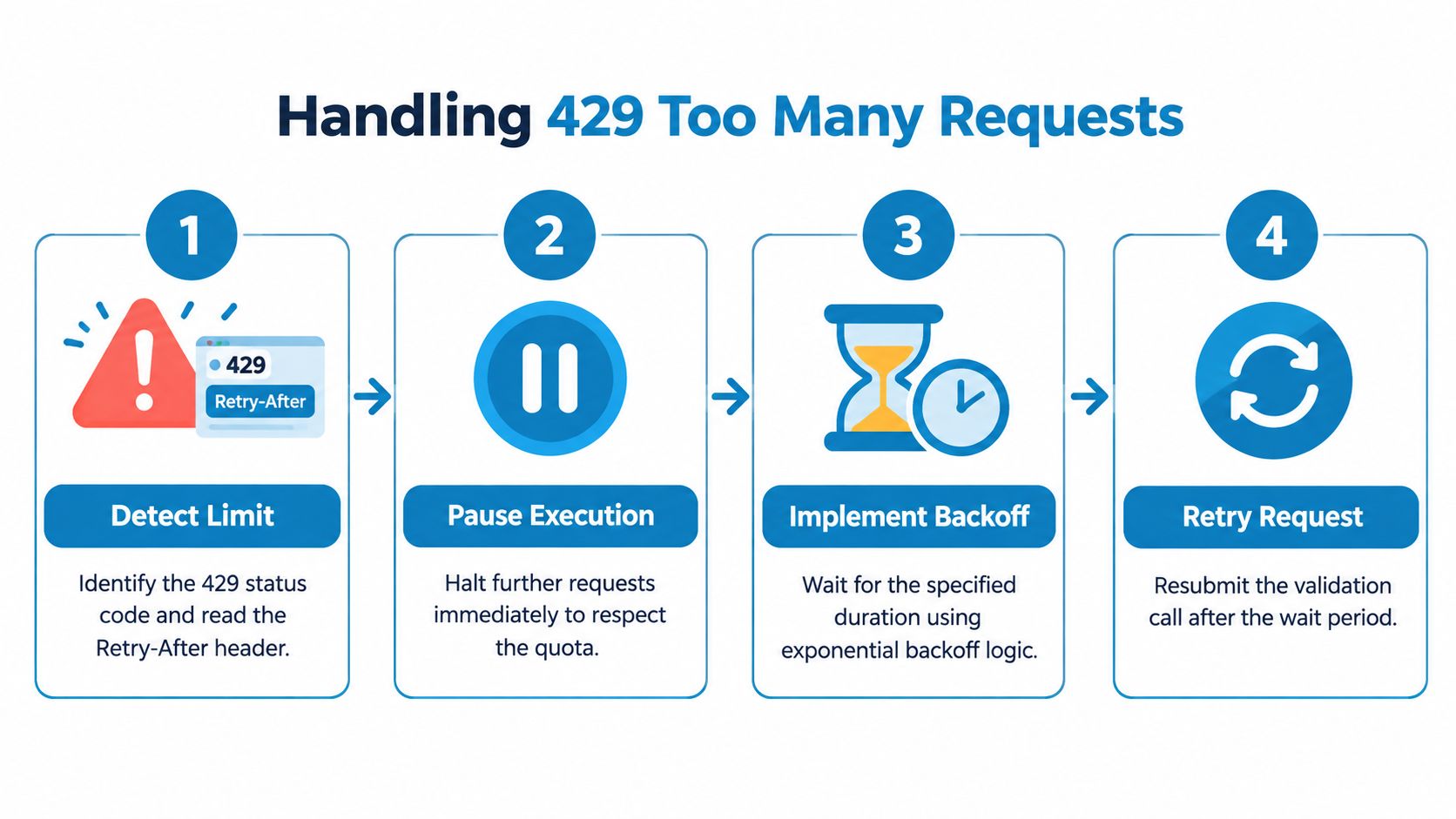
A checkout can trigger 429 Too Many Requests by validating the same customer repeatedly. Supplier imports can produce the same result when they submit every row without reusing recent results. The response means the applicable request limit was exceeded, not that the VAT number failed validation.
Read the Retry-After header when TaxID provides it. Pause for that interval, then retry with exponential backoff and jitter so concurrent workers do not resume together. If the header is absent, apply a bounded backoff policy defined by your client. A browser request should return a controlled pending state instead of waiting indefinitely. Preserve the submitted country and Tax ID so the queued retry uses the original input.
For background on provider enforcement, see this Fetchin explanation of server rate limits.
Make quota handling part of the data model
Cache successful validation results with the customer or supplier record according to TaxID's documented freshness policy. Store the timestamp, submitted country and Tax ID, returned status, and company identity. Include the country in the cache key because the same identifier string can have different meaning across jurisdictions.
Batch jobs belong behind a queue. A supplier-import worker can limit concurrency, persist progress, and resume from the last completed record rather than restarting the import. Monitor remaining quota headers when the API exposes them, and alert before live checkout requests begin receiving 429.
TaxID's VAT API rate limiting and caching guidance can inform this layer. Return a JSON body with a machine-readable code such as rate_limit_exceeded; use the HTTP status and headers to schedule the retry. Do not convert this response into an invalid VAT result.
Log the client identifier, route, time, and outcome for troubleshooting. Exclude secrets and unnecessary customer data, and review unusual traffic separately from normal quota exhaustion.
8. 503 Service Unavailable
503 Service Unavailable tells the client that the requested operation can't be completed temporarily. In a VIES-dependent VAT workflow, TaxID may be reachable while the upstream registry service is unavailable or unreachable. The request can be valid, the credentials can be correct, and the submitted Tax ID can still remain unverified.
Treat this as an operational state, not as a negative tax result. A service_unavailable body code should move the validation into a retry or pending queue. Marking the number as invalid would create a false business decision, while blocking every checkout until the registry recovers would turn an external outage into a direct revenue problem.
Choose a controlled fallback
A SaaS billing system can create the invoice with a pending-verification flag and review it later. A checkout can ask for an override, apply its approved fallback tax treatment, or defer the exemption decision. The correct choice depends on your tax policy and risk controls, but it must be explicit and auditable.
Use bounded retries with backoff. Don't keep a customer's browser request waiting while a remote registry recovers. Record when the outage began, which orders were affected, and whether each queued validation later completed.
Operational decision:
503generally means “preserve the request, wait, and retry safely,” not “reject the Tax ID.”
TaxID describes the VIES dependency and fallback considerations in its guide to handling a VIES service unavailable response. Your integration should also expose a clear internal state, such as pending_verification, so downstream invoice and compliance systems don't mistake temporary unavailability for an inactive company.

9. 502 Bad Gateway
502 Bad Gateway points to a broken response between gateway layers. A proxy, load balancer, or API edge received an invalid response from an upstream service. In a VAT-validation stack, the problem may sit in provider infrastructure, routing, a deployment, or the connection between the API and its registry dependency.
The distinction from 503 affects your response. A 503 commonly communicates temporary unavailability and supports a controlled retry path. A persistent 502 suggests a deeper gateway or infrastructure fault, so aggressive retries can amplify load without improving the customer outcome.
When your client receives 502, use a restrained process:
- Confirm scope: Check whether the error affects one country, one endpoint, one environment, or every request.
- Inspect provider communication: Use the TaxID status page and documented incident channels rather than guessing from the response body.
- Preserve the business event: Store the order or onboarding request so the validation can be completed later.
- Escalate persistent failures: Include timestamps, request IDs, endpoint, region, and response headers in the support report.
Don't turn 502 into vat_invalid. The registry didn't provide a reliable negative result. For critical billing, maintain a manual verification path and a clearly marked pending state.
Monitoring should distinguish 502 from application-level 500 responses. A 500 usually means the API encountered an unexpected internal condition. A 502 gives stronger evidence that a gateway or upstream boundary failed. That difference helps the provider and your team select the right logs and owner.
10. 201 Created
201 Created is less common for a simple validation request because the primary operation usually returns a result rather than creating a durable resource. It becomes appropriate when the server persists something as part of the operation, such as a validation audit record, compliance event, or historical result.
Imagine a finance platform that submits a Tax ID and receives a newly created validation record. The JSON may contain the validation result and record identifier, while the Location header identifies where the new resource can be retrieved. Your client shouldn't treat 201 as interchangeable with 200, because the lifecycle is different.
The application should:
- Read the
Locationheader: Store the resource reference when the API provides one. - Persist the record ID: Use it to retrieve the audit entry or connect it to the invoice and customer.
- Record the event time: Keep the response, status, and decision context together for compliance review.
- Avoid duplicate creation: Use an idempotency strategy when repeated submissions could create multiple audit entries.
A 201 response means the request succeeded and a server-side resource was created. It doesn't necessarily mean the VAT number itself was accepted for reverse charge. As with 200, inspect the body's validation result before making the tax decision.
Status semantics improve auditability. A client that understands the difference between “validation returned” and “validation record created” can keep its billing database, compliance history, and retry logic aligned. If no resource is created, 200 is usually the clearer contract. If one is created, document the identifier and retrieval behavior explicitly.
Top 10 API Response Codes Comparison
| Response (HTTP) | Implementation Complexity 🔄 | Resource Requirements ⚡ | Expected Outcomes / Impact 📊⭐ | Ideal Use Cases | Key Advantage 💡 |
|---|---|---|---|---|---|
| 200 OK | Low 🔄, simple success handling | Low ⚡, JSON parsing + optional Redis cache | Reliable validation result; enables real-time VAT flows ⭐⭐⭐ 📊 | SaaS billing, B2B checkout, onboarding | Fast cached lookups; seamless Stripe integration |
| 400 Bad Request | Low 🔄, input & format validation | Minimal ⚡, client/server validators only | Stops malformed requests; saves upstream calls ⭐⭐ 📊 | Form validation, checkout UX | Prevents wasted VIES calls; guides user fixes |
| 422 Unprocessable Entity | Medium 🔄, VIES lookup + error mapping | Moderate ⚡, external registry calls, caching | Authoritative "ID not registered" response; triggers compliance/fraud flows ⭐⭐ 📊 | KYC/compliance, fraud detection, B2B checkout | Distinguishes format vs registry failure; enables manual review |
| 401 Unauthorized | Low 🔄, key-based auth check | Minimal ⚡, auth lookup & key verification | Blocks unauthenticated access; protects data/quota ⭐⭐ 📊 | API security, multi-tenant SaaS | Simple key rotation/revocation; easy server-side enforcement |
| 403 Forbidden | Medium 🔄, scope/role checks (RBAC) | Low–Moderate ⚡, policy store, scope metadata | Prevents privileged actions without permission ⭐⭐ 📊 | Role-based access, multi-team platforms | Enforces granular permissions; prevents escalation |
| 404 Not Found | Low 🔄, routing/version validation | Minimal ⚡, URL/version routing | Signals wrong endpoint or deprecated version; aids integration ⭐ ⭐📊 | Integration testing, API version management | Catches typos and migration issues early |
| 429 Too Many Requests | Medium 🔄, rate limiter + retry strategy | Moderate ⚡, quota store, headers, monitoring | Throttles excess usage; requires backoff handling ⭐⭐ 📊 | Batch imports, scaling SaaS, supplier validation | Protects platform stability; clear upgrade path |
| 503 Service Unavailable | Low–Medium 🔄, handle transient upstream outage | Low–Moderate ⚡, retry queues, async fallback | Temporary upstream outage; allows graceful degradation ⭐⭐ 📊 | Billing resilience, outage-tolerant workflows | Enables async validation and conservative tax treatment |
| 502 Bad Gateway | High 🔄, infrastructure/proxy failure handling | High ⚡, ops intervention, incident response | Critical failure requiring escalation; service disruption ⭐ 📊 | On-call response, infrastructure monitoring | Clear signal to escalate and trigger incident ops |
| 201 Created | Medium 🔄, persist audit/resource creation | Moderate ⚡, storage for records & Location header | Creates auditable validation record; supports compliance ⭐⭐ 📊 | KYC, audit trails, fintech compliance | Server-side audit trail for dispute resolution and audits |
Turn Status Codes Into Reliable Workflows
A dependable VAT-validation integration starts with a short decision sequence, not a giant switch statement that treats every non-success response alike. First, inspect the HTTP status. Then parse the documented custom code and the body fields. Finally, choose a business action that matches whether the request needs correction, the caller needs access, the service needs time, or a human needs to investigate.
For a successful transport response, inspect the validation result. 200 OK confirms that the API handled the request, but it doesn't by itself confirm that the Tax ID is active or eligible for a tax treatment. Your client should branch on the body's valid or status field, store the returned company identity where appropriate, and attach enough context to the customer, invoice, or supplier record for later review.
For client-side failures, keep the distinctions precise. 400 Bad Request means the payload, syntax, or required input needs correction. 422 Unprocessable Entity means the payload is understandable, but the Tax ID fails semantic or registry validation. A user should receive different guidance for “select a country and correct the format” than for “this number couldn't be confirmed.”
Authentication and authorization also need separate branches. 401 Unauthorized calls for a credential or secret-configuration check. 403 Forbidden calls for a scope, account, environment, or policy check. Neither should trigger an endless retry loop, and neither should expose credentials or internal policy details in the browser.
The retry decision is equally important. 429 should respect the provider's rate-limit guidance and use queued work, caching, and backoff. 503 can represent a temporary upstream dependency problem, so preserve the validation request and move it into a controlled pending flow. 502 suggests a gateway or infrastructure fault, so limit retries, check provider status information, and escalate when the failure persists. These distinctions align with the broader API design guidance that recommends specific official codes rather than defaulting every failure to 500, as discussed by Google Cloud's REST API error guidance.
Test the branches you depend on
Create representative tests for a valid Tax ID, a malformed body, a correctly formatted but unverified number, missing credentials, insufficient access, an incorrect route, a rate-limit response, and each upstream failure state. Assert the HTTP status, custom code, required body fields, and relevant headers. Also test that your checkout doesn't apply reverse charge when the body says the identifier is unverified, even if the HTTP status is 200.
Record the method, endpoint, provider request ID, response status, custom error code, latency, retry decision, and business object ID. Redact API keys and avoid retaining more customer data than your compliance process requires. These records let support teams explain what happened without asking a developer to reproduce a historical checkout.
A compact, opinionated response contract is easier to maintain than a sprawling list of loosely defined codes. Research on real-world REST specifications found systematic misuse of HTTP statuses and showed the dominance of 200 OK for successful requests, reinforcing the need for consistent semantics and contract tests. The study derived usage rules from HTTP standards and REST principles in its analysis of REST API status-code usage.
TaxID is relevant for teams that need standardized VAT validation outcomes, caching, and a resilience path around VIES-dependent workflows. The right implementation still belongs in your application: decide when to approve, when to ask for corrected data, when to queue, and when to escalate. The API can provide the signals, but your billing system must turn those signals into safe, observable decisions. For a broader treatment of core error handling concepts, keep the same principle in mind: error handling should preserve context and guide the next action, not merely suppress exceptions.
TaxID provides a developer-first REST API for validating VAT and company identification numbers and returning structured validation outcomes, company details, and machine-readable errors. Use its caching and VIES-resilience features to build the status-code branches described here, then visit TaxID to review the documentation and connect a validation workflow to your billing, checkout, or compliance system.