Your customer enters a VAT number at checkout, selects the reverse-charge option, and expects the invoice to be correct. A manual lookup in the EU VIES portal times out, or the customer enters a country prefix with the wrong format. If your system treats that response as proof that the number is invalid, you can reject a legitimate business, apply the wrong VAT treatment, or leave your finance team with no evidence for the decision.
To check a VAT number online reliably, you need more than a green “valid” label. You need input normalization, country-aware validation, a clear distinction between invalid and unavailable responses, and an audit trail that connects the result to the invoice or customer record.
Table of Contents
- The Hidden Risks of Manual VAT Checking
- Step-by-Step Guide to Using EU VIES
- Common Pitfalls and False Negatives
- Manual Checks vs Programmatic API Integration
- Integrating a Reliable VAT Validation API
- Best Practices for Ongoing Compliance
The Hidden Risks of Manual VAT Checking
A SaaS company can lose a sale without making a tax calculation error. The failure may happen earlier, when a checkout form sends a poorly formatted identifier to VIES and receives no usable response. A developer sees the failed request, maps it to invalid, and the customer's business account is denied reverse-charge treatment.
That workflow looks harmless when someone checks one number in a browser. It becomes fragile when customers validate VAT IDs during checkout, suppliers are onboarded automatically, or a billing platform creates invoices without human review. A browser session gives an operator a result at one moment. It doesn't give an application a retry policy, an availability state, structured logs, or a safe fallback.

The underlying reason matters. After the EU Single Market launched on 1 January 1993, customs formalities between Member States were removed, so Eurostat introduced Intrastat to collect intra-EU trade information directly from businesses. VAT identification data became part of the administrative infrastructure supporting cross-border trade measurement and tax compliance, as Eurostat explains in its Intrastat overview.
Why a browser lookup breaks at scale
Manual checking has three operational weaknesses:
- It depends on human formatting. Users may include spaces, punctuation, duplicate prefixes, or characters from a copied invoice.
- It hides system state. A timeout, service outage, and genuine no-match response can look similar to an operator.
- It produces weak evidence. Unless someone saves the returned details and timestamp, the business may not be able to show what it checked when the invoice was issued.
The compliance stakes are material. The EU's 2024 VAT Gap report estimated that Member States lost approximately EUR 89 billion in 2022, equal to 7.0% of total VAT liability, while VAT revenue represented 7.2% of EU GDP and 15.7% of total government revenue in 2023. Those figures appear in the European Commission's VAT Gap report. A VAT check won't eliminate fraud, and a valid identifier doesn't prove every tax condition, but it creates a meaningful control before exemption or reverse charge is applied.
For a separate business context, teams can also review guidance on how to verify VAT on an Irish shelf company. The practical lesson is the same: validate the identifier against an authoritative source instead of trusting a number copied into a document.
If you're designing the failure path rather than the happy path, the distinction between a no-match response and a service failure is covered in this guide to EU VAT number checks.
Step-by-Step Guide to Using EU VIES
A manual VIES check is useful when support needs to inspect one customer record, finance wants to confirm what happened on a past invoice, or engineering needs to compare portal behavior with an API response. It gives you a direct view of what the underlying member-state connection returns. VIES is a lookup interface into national VAT databases, not one central EU register, so the result depends on the issuing country's records and whether that service is responding at the time.
1. Identify the issuing country
Start with the country that issued the VAT number. Do not infer it from the billing address, shipping destination, or group headquarters. The prefix on the VAT number determines which national source VIES will query.
That sounds obvious, but it is a common source of bad checks in production and in back-office reviews.
Country formats differ, and the prefix sits in front of a country-specific sequence of digits or characters. Greece is the edge case teams often miss. In VIES, the prefix is EL, not GR.
2. Normalize the number before you submit it
In the portal, select the country first, then enter only the identifier in the number field. Strip spaces, punctuation, and copy-paste noise before you submit the query. Keep the original customer input in your records, but validate against the normalized form.
This is also how software should behave. Normalize first. Apply country-specific structural rules next. Then send the cleaned value to VIES or to the relevant national authority, in line with the European Commission's VAT identification guidance.
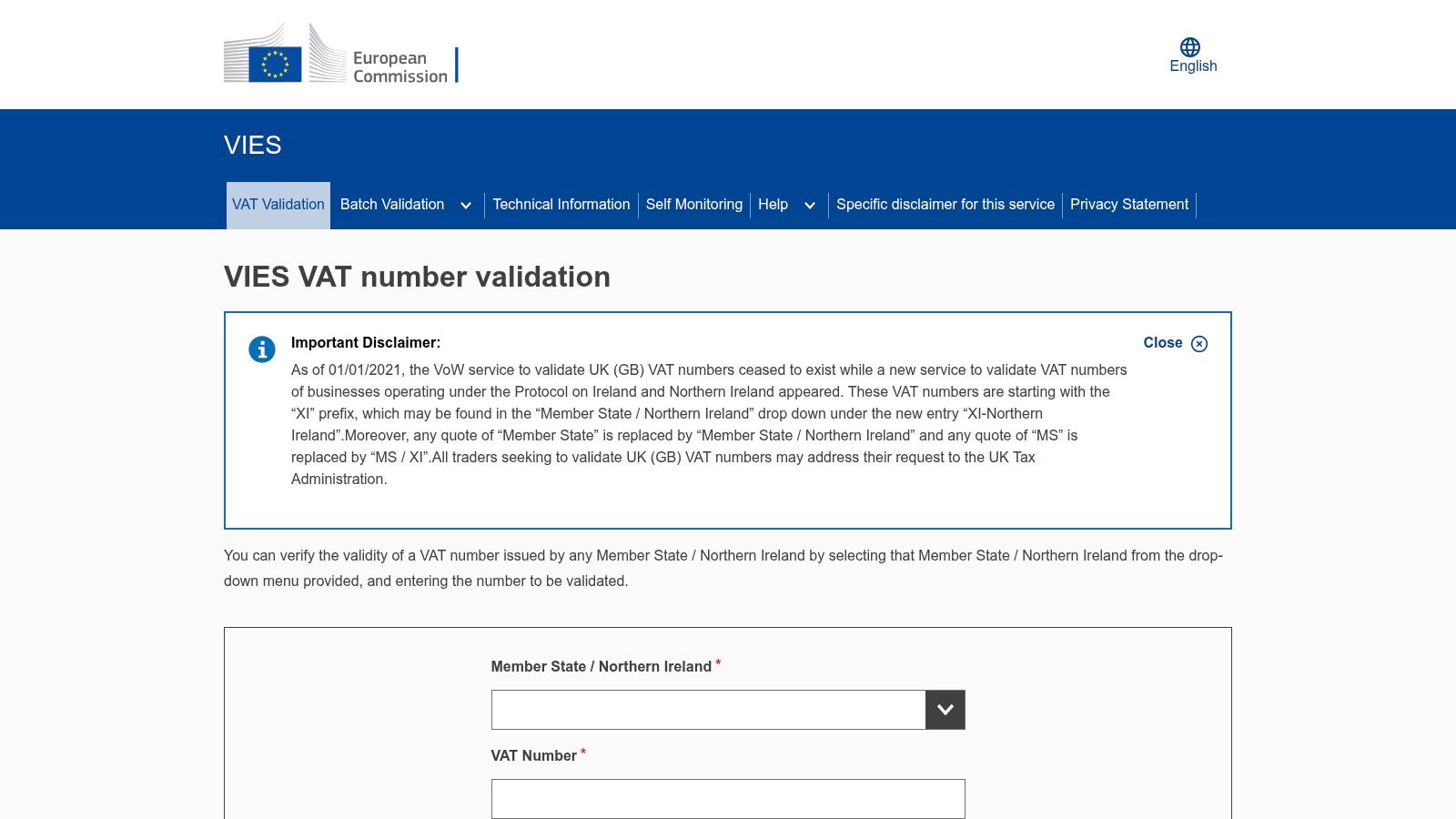
3. Submit the query and store the full result
A successful response usually confirms that the number is valid for the relevant intra-EU context and may return the registered legal name and address. Save those returned fields. Do not reduce the outcome to a single pass or fail flag.
For an audit trail, keep:
- The exact VAT number that was queried
- The selected country
- The returned legal name and address
- The query timestamp
- The complete response state, including any availability message
That last field matters. In real systems, the hard part is separating an invalid number from a timeout, upstream outage, or incomplete member-state response. Manual portal checks help you see those states directly before you design error handling around them. For a portal-focused walkthrough, see this guide to using VIES.
4. Treat failed lookups carefully
A failed lookup is not one thing. Start with the basics. Recheck the prefix, remove formatting errors, and confirm with the customer that the number is activated for intra-EU transactions. If the answer still does not resolve, keep the failed response and contact the issuing country's tax authority before applying an exemption or reverse charge based on guesswork.
VIES only checks availability for intra-EU use. A business can have a domestic VAT registration while not being activated for cross-border trade, or a recent registration change may not yet appear in the national system. The Your Europe explanation of VIES checks also notes the special treatment of Great Britain and Northern Ireland after Brexit.
Common Pitfalls and False Negatives
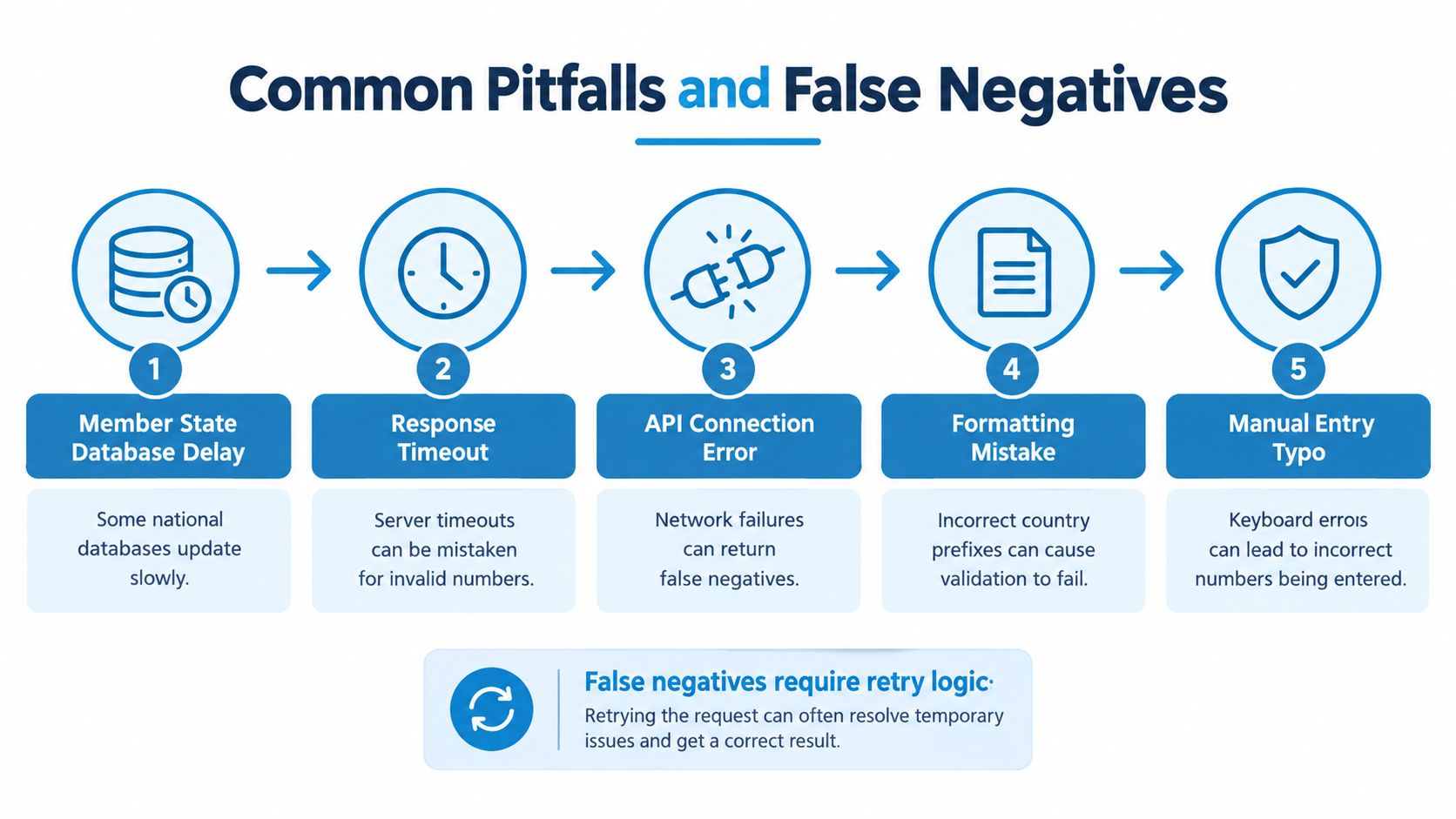
A VAT number can be correctly issued and still produce an unusable response. The first engineering mistake is collapsing every unsuccessful request into one boolean value.
Your application should distinguish at least three states:
- Valid, the remote service confirmed the identifier.
- Invalid or no match, the service answered but did not confirm the identifier.
- Unavailable, the service could not provide a dependable answer.
Only the first state should support automatic reverse-charge treatment. The third state needs retry and fallback handling, not a customer-facing rejection.
Formatting and country rules
Formatting errors are deterministic and should be handled before a network request. Normalize spaces and punctuation, extract the country prefix, and apply the country's structural rules. This prevents a clearly malformed value from consuming a remote lookup and gives the customer immediate, useful feedback.
Don't use local format failure as proof that the company isn't registered. It only means the submitted representation doesn't satisfy the expected structure.
Country-specific rules can also create false negatives. Greece uses EL in VIES. Standard Great Britain GB numbers aren't validated through the EU VIES web service, while Northern Ireland has a separate XI context for relevant EU transactions. Your country selector and validation rules must model those distinctions explicitly.
Availability failures
VIES retrieves information from national databases, and the European Commission doesn't control or guarantee the accuracy of those underlying records. A national database can be unavailable or temporarily out of sync while the business remains legitimate.
That creates a critical distinction in production:
Never translate a timeout or service-unavailable response into “invalid.”
Use bounded retries with exponential backoff for transient failures. After the retry policy is exhausted, keep the checkout usable where your tax policy allows it, mark the result as unresolved, and route the case for review. The exact treatment should be agreed with your tax adviser, but the software state must remain honest.
Registration and activation gaps
A “no match” response isn't always evidence that the company has no VAT number. The identifier may not have been activated for intra-EU transactions, registration may be incomplete, or a national authority may not yet have propagated a change.
The European Ombudsman documented cases in which businesses reported that more than half of their customer VAT numbers weren't listed as valid, with smaller companies often failing to notify tax authorities that they intended to trade within the EU. That finding is discussed in the Your Europe VIES guidance, which also supports a practical escalation process:
- Retry after correction. Recheck the country and normalized identifier.
- Ask for confirmation. Request the customer's VAT certificate or confirmation of intra-EU activation.
- Preserve evidence. Store the response and timestamp, including the failed state.
- Escalate carefully. Contact the issuing authority instead of granting exemption automatically.
A remote validation result confirms availability in the relevant system. It doesn't independently verify the customer's entire business relationship, transaction purpose, or every condition attached to a VAT treatment.
Manual Checks vs Programmatic API Integration
A customer enters a VAT number during checkout, expects tax to be calculated correctly, and your system has a few seconds to decide what to do. That is a production problem, not a browser task.
| Requirement | Manual VIES lookup | Programmatic API |
|---|---|---|
| Customer enters a number at checkout | An employee must intervene | The application can validate during the flow |
| Input cleanup | Depends on the operator | Normalization can run before every request |
| Timeout handling | Often ambiguous | Separate retryable failures from invalid responses |
| Evidence | Must be saved manually | Store structured results with the invoice record |
| High-volume processing | Slow and inconsistent | Suitable for automated queues and billing events |
| Response format | Portal-specific presentation | JSON fields and machine-readable states |
The VIES portal is still useful for investigation. Finance teams can use it to review a disputed customer, compare the returned legal details with onboarding data, or check an unusual supplier manually. Developers also benefit from seeing the source system once before they automate against it.
It does not belong in the request path of a checkout, billing job, or account activation flow. A human can usually tell the difference between a typo, a timeout, and a temporary upstream outage. Application code needs those states returned explicitly, or it will misclassify failures as invalid VAT numbers and block legitimate orders.
Direct integration with raw VIES has another cost. The service is SOAP-based, so your team has to own XML payloads, transport failures, response parsing, country-specific edge cases, retries, caching, and operational monitoring. That can make sense if VAT validation is part of your product. For a small SaaS team that just needs a reliable decision inside Stripe, a custom checkout, or an invoicing worker, it usually creates more maintenance than value.
What an API layer changes
A REST API exposes the same lookup in a format that fits modern backend services. It can normalize input, apply country-specific format checks before the remote call, map provider behavior to stable error codes, and return clean JSON to Node.js or Python services.
TaxID wraps the European Commission's SOAP-based VIES service with country-specific format checks, Redis-backed caching, and sub-10ms responses for cached lookups. That does not make the upstream registry perfect. It gives your application a cleaner boundary and better failure handling.
The trade-off is straightforward. A direct SOAP integration gives full control, but your team also owns every reliability feature and every operational failure. An API provider adds a dependency and a service cost, while reducing the VAT-specific infrastructure your developers need to build, test, and watch in production.
For implementation details, the REST API integration guide is a better reference than trying to reproduce a browser workflow in backend code. Keep the API call on your server, where credentials, retry policy, and tax treatment rules can be enforced consistently.
Integrating a Reliable VAT Validation API
A checkout reaches the payment step, VIES stalls, and your code marks the VAT number as invalid. That is how valid business customers get taxed incorrectly, support tickets appear, and invoice corrections start. Build the flow so your system can tell the difference between bad input, a genuine no-match, and an upstream failure.
A practical integration usually has four parts.
Accept and normalize the input
Keep the raw value the customer entered for support and audit purposes. Validate against a normalized version. Strip spaces and punctuation, detect the country prefix, and run format checks before calling any remote service.
That first pass matters because it lets you reject malformed input immediately and keep noise away from VIES. It also avoids a common reporting mistake. If the format is wrong locally, the result is malformed input, not unregistered and not invalid.
Send the request from your backend
Run the validation call on the server. The browser can collect the country and VAT number, but credentials, retry rules, and tax treatment logic belong in backend code.
Use a short timeout and a bounded retry policy. Then map provider responses into a small internal state model your application understands, such as valid, invalid, unavailable, and needs_review. Those labels should describe the outcome that occurred. A timeout is not the same as an invalid number. A transport error is not the same as a no-match from the registry.
This is one reason teams usually prefer an API layer over raw SOAP in production. The value is not just a different protocol. It is stable error handling, cleaner integration in modern services, and a simpler way to keep frontend behavior consistent when the upstream system behaves unpredictably.
Persist the evidence with the customer or invoice
When a result is valid, save the queried number, country, timestamp, and any returned legal name or address. Tie that record to the customer version or invoice event that used it.
Without that snapshot, a later account edit can overwrite the evidence behind an earlier invoice. With it, support can see why a checkout got a given tax treatment without trying to reproduce an old lookup under different registry conditions.
Handle service degradation explicitly
Caching can help keep checkout working during temporary upstream trouble, but only if the cache policy is visible in your data model. Store the validation time and cache status, and define when the record must be checked again. Cached success can support continuity. It should not turn into a permanent assumption that the VAT number is still valid.
Implementation rule: A remote failure should create an unresolved tax-validation state, not an invalid customer state.
The same separation applies to nearby data pipelines. If your team enriches company or supplier records from public sources, the Context.dev web scraping API can support that research process. Scraped data should not replace authoritative VAT validation.
The following video provides a visual view of the product workflow and API-oriented approach.
Connect the validation outcome directly to invoice generation. The checkout and the billing worker need the same decision inputs. Pass the verified state, timestamp, country, and returned business details into the invoice command, then record any later override together with the person or service that applied it.
That audit trail matters even more as EU reporting becomes more structured. Council Regulation 2025/517 says relevant VAT identification information in central VIES should be updated without delay and retained for 10 years to support fraud detection, as set out in the official regulation text. The same policy context includes a Commission estimate that e-invoicing could reduce VAT fraud by up to €11 billion annually. It also includes an estimate of more than €4.1 billion per year in lower administrative and compliance costs over the following decade. From 1 July 2030, cross-border B2B transactions are scheduled to move to digital reporting requirements based on mandatory e-invoicing, subject to the phased rollout. The practical takeaway is simple. Store evidence now, because rebuilding that history after invoice automation is in place is harder and usually messier.
Best Practices for Ongoing Compliance
Treat VAT validation as customer master-data management, not a one-time checkout decoration. Revalidate when a customer changes its country, legal entity, VAT number, or billing profile, and retain the prior result rather than overwriting history.
A resilient operating checklist looks like this:
- Separate states: Keep valid, invalid, no match, timeout, and unavailable distinct.
- Cache deliberately: Store successful results with timestamps and an explicit expiry policy.
- Retry transient errors: Use exponential backoff, then route unresolved cases for review.
- Protect evidence: Save the queried number, country, returned identity data, response state, and timestamp.
- Review overrides: Require a reason when staff apply a different tax treatment from the automated result.
- Connect systems: Pass the validation decision into customer records, invoices, credit notes, and reporting exports.
Validation supports compliance, but it doesn't decide every VAT question. The transaction type, customer location, place of supply, and applicable rules still require tax expertise.
TaxID provides a REST-based VAT validation service that returns structured status and, where available, registered company details while wrapping the EU VIES workflow for application use. Visit TaxID to assess its free browser checker and API options for a checkout or billing system that must handle timeouts without misclassifying legitimate customers.