A lot of teams discover VAT validation at the worst possible moment. A buyer from Germany or France lands on your checkout, enters a VAT number, expects reverse charge treatment, and gets blocked by a brittle validation flow that treats every non-success response as fraud or bad input.
That's usually not a tax problem. It's an integration problem.
If you need to verify a VAT ID inside a live SaaS checkout, you're not building a form nicety. You're putting a tax dependency in the middle of revenue collection. The difference between a smooth B2B sale and a failed one often comes down to whether your system can tell apart bad input, an invalid number, and a temporary upstream outage.
Table of Contents
- Why VAT Validation Breaks Checkout When Done Wrong
- How VIES and TaxID Validation Actually Work
- Validating a VAT ID With TaxID From Input to Verified Result
- Handling Responses Error Codes and Edge Cases Without Blocking Sales
- Production Tips for Resilient VAT Checks Caching and Retries
- Your Next Steps to Launch Compliant VAT Verification
Why VAT Validation Breaks Checkout When Done Wrong
The most common implementation mistake is simple. A customer enters a VAT number, your app calls a remote validator, anything other than a clean success gets mapped to “invalid VAT number,” and checkout stops.
That looks safe from a compliance perspective. In practice, it blocks legitimate B2B buyers.
The brittle flow most teams ship first
Here's the version I've seen repeatedly in Stripe-based SaaS billing:
- Customer enters VAT ID: Usually at account creation, checkout, or the billing details step.
- Frontend fires one API call: No normalization, no local format screening, no distinction between input errors and remote failures.
- Backend gets a non-success response: Timeout, member-state outage, concurrency fault, or malformed input all land in the same bucket.
- Checkout shows rejection: The buyer can't proceed with reverse charge treatment, or can't proceed at all.
That flow feels strict, but it's poorly designed. VIES and related services can fail for operational reasons that have nothing to do with whether the buyer is a valid taxable business.
Practical rule: Never map “could not validate right now” to “this VAT ID is invalid.”
A second problem is where validation runs. Teams often bolt it into the final submit action of checkout, where any delay becomes a conversion issue. If you're building a custom UI, the billing review step is usually a better place to surface VAT status before payment confirmation. Something like a commerce checkout Vue component gives you a cleaner place to show tax identity, company details, and the final VAT treatment without making the buyer guess what happened.
What a resilient flow needs to do
A reliable implementation should aim for four clear outcomes, not one binary pass/fail gate:
- Valid: You can apply the expected B2B tax treatment and store the verification result.
- Invalid: The number doesn't pass local or authoritative checks.
- Temporarily unavailable: The upstream service isn't currently giving you a trustworthy answer.
- Retryable error: Concurrency or timeout conditions suggest you should retry rather than reject.
That distinction matters for both UX and invoicing operations. If the VAT number is invalid, blocking reverse charge treatment makes sense. If the validation service is temporarily unavailable, hard-blocking checkout is often the wrong product decision.
What works better in production
The practical pattern is:
- validate format locally first
- call a remote validator only for plausible IDs
- store machine-readable result states
- let finance decide what happens when the result is inconclusive
That's the difference between a tax checker and a checkout-safe tax validation system. One gives you a yes/no answer when everything is perfect. The other keeps selling when the world is messy.
How VIES and TaxID Validation Actually Work
Before writing code, it helps to understand what you're querying.
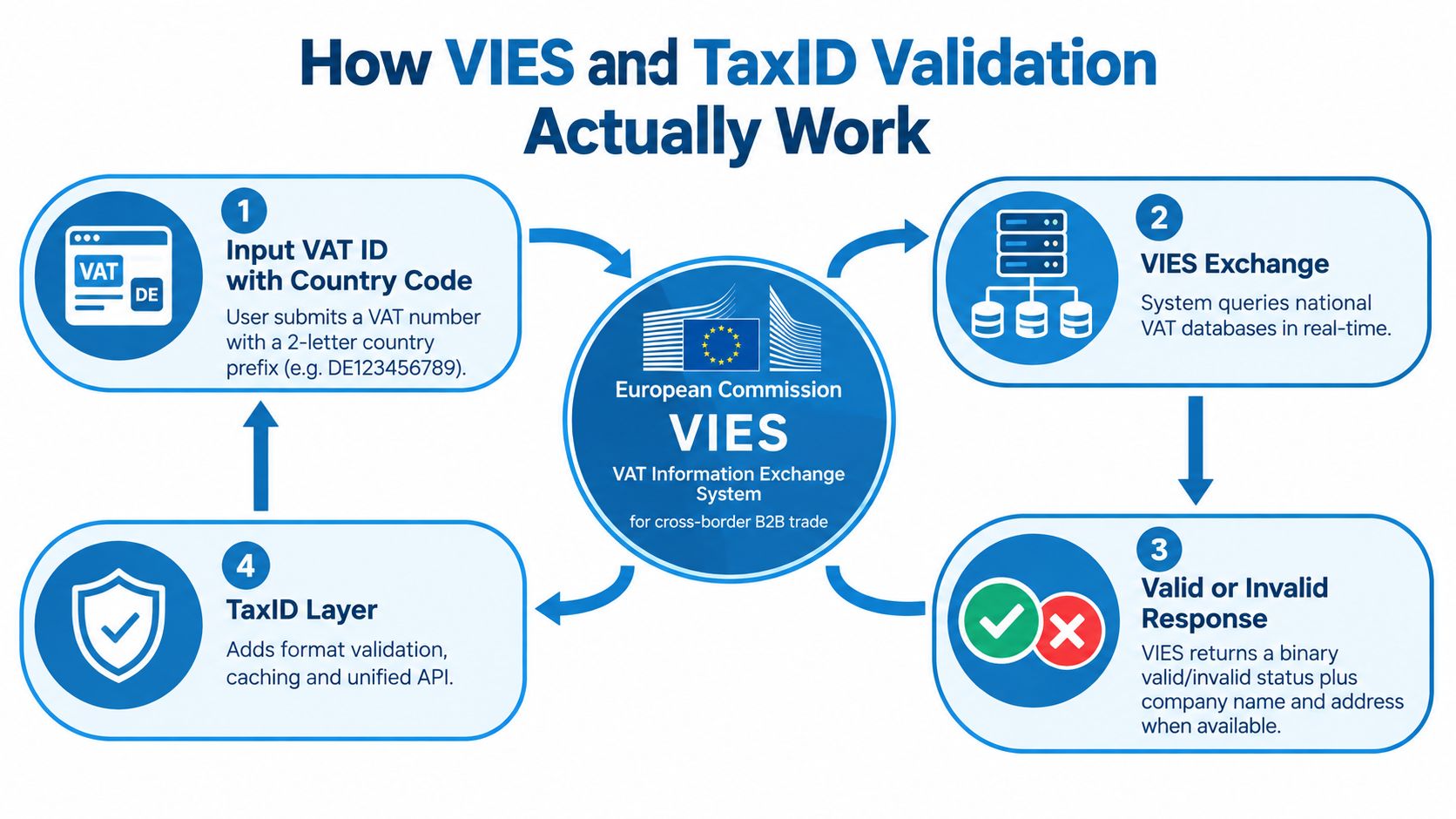
VIES is the European Commission's VAT Information Exchange System. The Commission's service documentation states that its objective is to provide confirmation of a VAT identification number under Council Regulation (EC) No. 904/2010, and the public service is the official mechanism used to verify VAT numbers for cross-border B2B trade in the EU through the European Commission VIES service documentation.
What VIES is actually checking
VIES isn't a single central VAT database. It works as a search layer across national registries.
The European Commission's open-data record describes VIES as the database for checking VAT validity for intra-Community supply of goods and services, and EU-facing guidance notes that it draws on all 27 EU national VAT databases plus Northern Ireland through the EU open-data VIES record. That architecture explains a lot of the odd behavior developers run into.
When you query VIES, you're effectively asking whether a given VAT registration appears as valid in the relevant national registry at that moment. The EU's consumer-business guidance says the public result is valid or invalid at the moment of query, which is useful but narrower than many teams expect.
Why “invalid” is more limited than it sounds
An “invalid” result doesn't mean VIES performed a broad legal analysis of the business. It means the queried registration doesn't currently validate in the upstream registry exposed through that country.
That distinction matters in billing systems. Buyers assume your form is checking whether they are a legitimate business. The service is checking whether a specific VAT registration is currently confirmed by the relevant authority through the VIES network.
VIES is authoritative for VAT status checks, but it's still dependent on member-state systems that can be unavailable, delayed, or strict about formatting.
There's also some nuance in what comes back on a positive match. A European Commission update in 2004 announced that, for positive validations, the service could display the taxable person's name and address for selected Member States. That changed VIES from a simple binary checker into a more useful compliance step for invoicing and audit trails, though coverage still depends on the underlying national registry.
Where a developer layer helps
A wrapper around VIES becomes practical. The hard parts usually aren't tax law. They're integration details.
- Input normalization: Uppercasing, stripping spaces, and removing common separators.
- Country-specific format checks: Catching obvious bad input before any remote call.
- Unified transport: Avoiding SOAP inside a modern checkout stack.
- Caching: Preventing repeated lookups from slowing down checkout.
- Consistent errors: Returning machine-readable states instead of brittle text blobs.
One example is TaxID, which exposes a single REST endpoint, runs country-specific format validation before remote calls, caches results for 24 hours in Redis, and returns clean JSON with machine-readable error codes. In a billing flow, that means you only hit VIES when the VAT number is structurally plausible, and repeated validations can return quickly from cache rather than waiting on the upstream network.
For a checkout or supplier onboarding system, that design is more than convenience. It's the difference between “validate when possible” and “dependably verify VAT ID without turning every upstream wobble into a lost sale.”
Validating a VAT ID With TaxID From Input to Verified Result
The cleanest implementation starts before any API request. Most bad VAT validation UX comes from sending raw user input straight into the authoritative check and then surfacing whatever comes back.
Start by making the input sane.
Normalize first, then validate
A buyer might enter spaces, lowercase letters, or punctuation copied from a PDF or old invoice. Your app shouldn't punish that.
The minimum normalization pass should:
- Trim whitespace: Remove leading and trailing spaces.
- Strip separators: Delete internal spaces, dots, and dashes if your parser allows them.
- Uppercase everything: Country prefixes should be normalized before validation.
- Keep the country prefix: Don't split it off and forget to restore it before lookup.
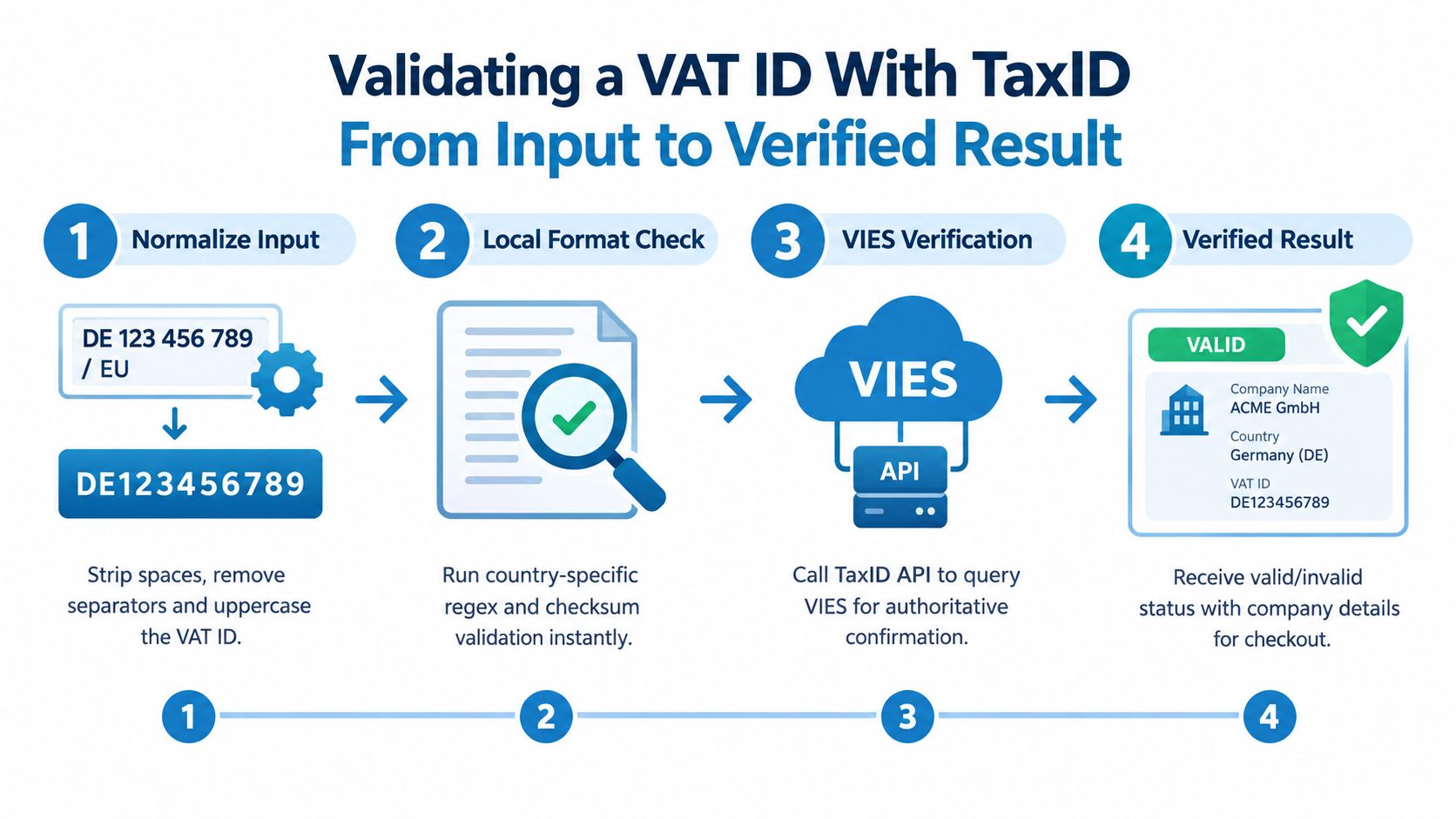
A tiny utility function does most of the work:
Node.js example for checkout input
function normalizeVatId(input) {
  return input
    .trim()
    .toUpperCase()
    .replace(/[\s.-]/g, "");
}
That's not enough by itself. You also want a local format gate before making a remote request.
Run a local plausibility check
Country-specific VAT formats differ. Some are numeric, some alphanumeric, and some include suffixes that buyers often omit or mistype. The point of local validation isn't to replace authoritative verification. It's to avoid wasting a network call on obviously bad input.
A practical billing flow uses two layers:
- Local format validation: Fast rejection for impossible inputs.
- Remote authoritative validation: Final confirmation for tax treatment.
If you're implementing this in Python and want a stable HTTP stack for retries, timeouts, and async variants, this roundup of Python HTTP clients is useful background before you wire the API call into billing code.
Call the validation endpoint and store the result
Once the VAT ID passes normalization and local plausibility checks, send it to your validation service and expect structured JSON back. In a REST wrapper, you want three kinds of fields:
- validation status
- returned business identity data
- machine-readable error information
Here's a simple Node.js example using fetch on the server side:
async function verifyVatId(vatId) {
  const normalized = normalizeVatId(vatId);

  const response = await fetch("https://api.taxid.dev/validate", {
    method: "POST",
    headers: {
      "Content-Type": "application/json",
      "Authorization": `Bearer ${process.env.TAXID_API_KEY}`
    },
    body: JSON.stringify({ taxId: normalized })
  });

  const data = await response.json();

  return {
    input: vatId,
    normalized,
    status: data.status,
    companyName: data.companyName || null,
    address: data.address || null,
    errorCode: data.errorCode || null
  };
}
And the same basic pattern in Python:
import os
import requests

def normalize_vat_id(value: str) -> str:
    return (
        value.strip()
        .upper()
        .replace(" ", "")
        .replace(".", "")
        .replace("-", "")
    )

def verify_vat_id(vat_id: str) -> dict:
    normalized = normalize_vat_id(vat_id)

    response = requests.post(
        "https://api.taxid.dev/validate",
        headers={
            "Authorization": f"Bearer {os.environ['TAXID_API_KEY']}",
            "Content-Type": "application/json",
        },
        json={"taxId": normalized},
        timeout=10,
    )
    response.raise_for_status()
    data = response.json()

    return {
        "input": vat_id,
        "normalized": normalized,
        "status": data.get("status"),
        "company_name": data.get("companyName"),
        "address": data.get("address"),
        "error_code": data.get("errorCode"),
    }
What to do with the result in billing
Don't throw the result away after checkout. Persist it with the customer billing profile, invoice context, or tax evidence record.
At minimum, store:
- The normalized VAT ID
- Validation status
- Returned legal name
- Returned address if present
- Timestamp of validation
- Error code if validation was inconclusive
That record helps when finance reviews invoices, support investigates a tax exemption dispute, or you need to revalidate later.
Implementation detail: Store both the original user input and the normalized value. Support teams often need to see what the buyer typed versus what your system actually validated.
A common Stripe setup is to validate when the buyer edits billing details, then save the normalized VAT ID and verification result into customer metadata or your own billing table before subscription creation. That way your tax logic doesn't depend on re-running a network call during invoice finalization.
If you want a REST-oriented walkthrough for wiring this into an app flow, the REST API integration guide is a good reference for request and response handling patterns.
Later in the implementation, a short visual walkthrough helps if you're handing this off to another engineer or ops teammate:
Where this belongs in the user flow
The best place to verify VAT ID is usually not after payment submission. It's while the buyer is still editing billing details.
That lets you:
- show company name and address back to the buyer
- apply B2B tax treatment before final totals are confirmed
- avoid charging the wrong amount and fixing it later
- separate tax validation errors from payment errors
That separation matters. Buyers can understand “we couldn't confirm your VAT ID yet.” They get frustrated when the payment form says checkout failed.
Handling Responses Error Codes and Edge Cases Without Blocking Sales
The dangerous shortcut is collapsing every non-valid response into one state. That's what causes false negatives and unnecessary checkout failures.
A stronger implementation classifies the response, then ties each class to a checkout action.
The four states that matter
A production billing system should classify VAT verification results into at least these four states:
- Valid
- Invalid
- Temporarily unavailable
- Retryable timeout or concurrency error
That model isn't arbitrary. It lines up with how VIES faults behave in practice. A VAT verification flow should normalize input, run a country-specific format check, then call the remote VIES service only for plausible numbers, because VIES faults are semantically distinct and include INVALID_INPUT, GLOBAL_MAX_CONCURRENT_REQ, MS_MAX_CONCURRENT_REQ, SERVICE_UNAVAILABLE, MS_UNAVAILABLE, and TIMEOUT, as described in this overview of VIES fault handling and uptime behavior.
VAT Validation Response Action Matrix
| Response State | Example Code | Checkout Action | Invoicing Follow Up |
|---|---|---|---|
| Valid | valid |
Apply expected B2B VAT treatment and let checkout continue | Save validation result with company details |
| Invalid | vat_invalid or INVALID_INPUT |
Don't apply reverse charge based on that ID. Ask customer to correct input | Keep invoice on standard treatment unless corrected and revalidated |
| Temporarily unavailable | service_unavailable or MS_UNAVAILABLE |
Allow checkout with warning or flag, based on your risk policy | Revalidate later before final tax review if needed |
| Retryable | TIMEOUT, GLOBAL_MAX_CONCURRENT_REQ, MS_MAX_CONCURRENT_REQ |
Retry in background or after brief delay. Don't immediately reject buyer | Queue automatic recheck and log the technical fault |
What each state means in real checkout behavior
Valid is the easy path. Apply the intended tax handling, store the result, and show the buyer the registered entity data if you have it.
Invalid should stop the exemption logic, but not necessarily the sale. In many SaaS products, the better UX is to let the buyer continue as a taxed customer unless your legal process requires a verified VAT ID before account activation.
Temporarily unavailable is where many make the wrong call. Official guidance says VIES can be unavailable because national databases are being backed up and users should wait and retry later. That means an unavailable check is not the same thing as a failed business identity check.
Retryable errors are technical, not tax-semantic. Concurrency faults and timeouts usually mean the right next move is a controlled retry, not a customer-facing rejection.
If your logs show “invalid VAT” when the upstream service actually timed out, your reporting is lying to product, support, and finance at the same time.
Don't hard-block on upstream downtime
This isn't a theoretical edge case. Monitoring and status reporting show that VIES availability can fluctuate in operationally meaningful ways. One 2026 developer guide reported about 98.71% aggregate availability over a five-day sample, with 174 of 198 observed outages concentrated in three countries, according to this VIES status analysis.
For checkout teams, the takeaway isn't the exact figure. It's the operational implication. Your buyer-facing logic needs a policy for what happens when validation is inconclusive during a live transaction.
A practical policy usually looks like this:
- Low risk sale: Allow checkout, flag the account, revalidate asynchronously.
- Higher risk account or large invoice: Allow account creation but hold tax exemption until revalidation.
- Supplier onboarding: Accept submission, mark verification pending, don't auto-reject vendor setup.
If you want concrete resilience patterns for VIES downtime behavior, the VIES downtime resilience guide is a solid implementation reference.
Production Tips for Resilient VAT Checks Caching and Retries
Once the logic is correct, the next problem is keeping it stable under load and during upstream wobble.
A VAT check inside checkout should behave more like a payment dependency than a form helper. That means caching, retry control, observability, and a fallback UX all matter.
Design for repeat lookups
The same customer often edits billing details more than once. Support may also trigger revalidation from an admin panel. Without caching, you'll keep hitting the upstream validator for the same normalized VAT ID.
That's wasteful and fragile.
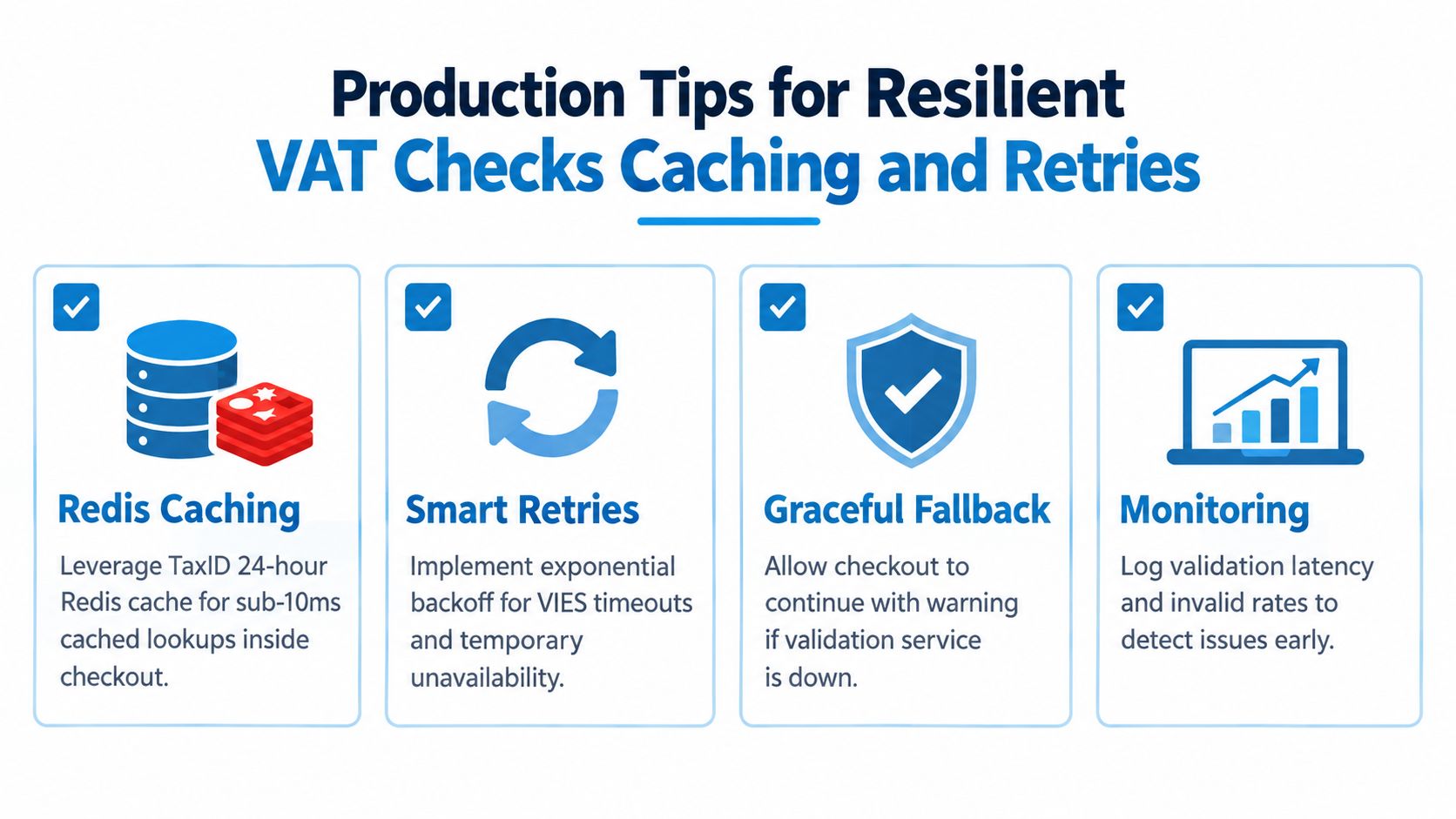
A cached lookup layer changes the feel of the whole checkout. With TaxID's Redis-backed 24-hour caching and sub-10ms cached lookups, repeated validations can return fast enough to feel local rather than remote. That's especially helpful when VAT validation runs while totals are recalculated in real time.
Retry smart, not blindly
Not every failure deserves an automatic retry.
Use controlled retries for:
- Timeouts: Retry with backoff rather than immediate loops.
- Concurrency faults: Wait briefly, then retry once or twice.
- Temporary service unavailability: Retry asynchronously if the buyer has already moved on.
Avoid retry storms. If a member-state system is unavailable, hammering it harder won't improve your result.
Operational habit: Log the machine-readable error code, not just the human message. Error classes are what let you tune retry policy later.
Keep the UX honest
The frontend copy matters more than most engineering teams think. Don't tell buyers “invalid VAT number” unless you got an invalid result.
Use language that matches the state:
- Valid: “VAT ID confirmed”
- Invalid: “We couldn't confirm this VAT ID. Please check the number.”
- Unavailable: “We couldn't verify this VAT ID right now. You can continue and we'll recheck it.”
- Retrying: “Verification is taking longer than expected”
That small distinction reduces support tickets because customers understand whether they made a mistake or your system is waiting on an external dependency.
Monitor patterns, not just incidents
You don't need elaborate tax observability to get value here. Track a few simple signals:
- Validation latency by country
- Rate of invalid versus unavailable responses
- Retry volume
- How often checkout proceeds with a verification flag
For teams that need to manage throughput and repeated lookups, this guide on VAT API rate limiting and caching patterns is useful when deciding where to cache and when to revalidate.
For supplier onboarding and account management, it also helps to run a scheduled revalidation job. That keeps your stored tax identity data current without forcing every recheck into the live checkout path.
Your Next Steps to Launch Compliant VAT Verification
The clean implementation is straightforward once you stop treating VAT validation as a one-shot yes/no call.
Normalize the input. Run a country-specific format check locally. Call the authoritative validator only for plausible values. Then classify the outcome into valid, invalid, temporarily unavailable, or retryable.
That model gives product, finance, and engineering a shared language for deciding what happens next.
A practical go-live checklist
Before shipping, make sure your team has done the following:
- Test valid and invalid paths: Use multiple countries and verify your UI doesn't collapse every failure into the same message.
- Simulate unavailability: Make sure checkout behavior stays sensible when the validator can't answer.
- Check tax logic end to end: Confirm reverse charge treatment only applies when your validation state supports it.
- Persist the result: Store normalized ID, returned entity data, status, and timestamp with the billing record.
- Enable caching: Repeated edits and retries shouldn't create repeated upstream lookups.
- Review invoice output: Make sure your invoicing flow uses the stored verification state consistently.
The teams that get this right usually don't build a SOAP wrapper themselves. They put a small, durable validation layer between checkout and the underlying registry, then they treat outages as an operational state instead of a customer error.
That's the practical path if you need to verify VAT ID without sacrificing either compliance or conversion.
TaxID gives developers a single REST API to validate VAT and company tax IDs, including EU VIES-backed checks, with format validation, caching, and machine-readable error handling built in. If you want to ship compliant VAT verification in a Stripe or custom billing flow without maintaining your own SOAP integration, take a look at TaxID.